Play microtones in your DAW today, using the keyboard you already have, or a custom-made one (how-to)
If you have spent any time making music with a standard keyboard, you already know the rules. Twelve notes per octave, the same twelve notes everywhere on the planet, the same twelve notes everywhere on your DAW. That system is called 12 equal divisions of the octave, or 12edo for short, and it is so deeply baked into modern instruments that most of us never notice it is a choice at all.
Microtonal music is what happens when you decide to use any other set of pitches. That might mean dividing the octave into 19, 22, 31, or 53 equal steps. It might mean using the pure whole-number frequency ratios of just intonation. It might mean a historical European temperament, a Turkish makam scale, an Indonesian gamelan tuning, or something you invented last Tuesday at 2am.
The good news: the gear you already own can probably do most of this. The slightly annoying news: getting MIDI to actually deliver those pitches takes a bit of setup. This article walks through the options.
Why standard MIDI is the bottleneck
MIDI was designed in 1983, and it bakes the 12-note assumption right into the protocol. A MIDI note message is just a number from 0 to 127, and by convention note 60 is middle C, note 61 is C sharp, and so on up the chromatic scale. There is no slot in the message to say “play this note 17 cents flat”.
Speaking of cents: a cent is one hundredth of a 12edo semitone. It is the standard unit microtonalists use to talk about how far a note sits from its 12-tone neighbour. Your tuner app uses cents. Most microtonal software does too.
To get non-12edo pitches out of a MIDI rig you need a workaround. There are three workarounds in common use, and which one you pick determines what controller and software you need.
Approach 1: retune the synth itself. Many software synths can load a Scala file (.scl) or a similar tuning file and just play in the new tuning. Your keyboard sends ordinary MIDI note numbers and the synth maps them to whichever pitches you defined. Simple, stable, no special controller needed.
Approach 2: pitch bend. MIDI does have a pitch bend message, originally meant for whammy-bar style pitch wobbles. You can hijack it to nudge each played note to the correct microtonal pitch. The catch is that classic pitch bend is per channel, not per note, so if you play a chord all the notes bend together. This led to the next approach.
Approach 3: MPE. MPE stands for MIDI Polyphonic Expression. It assigns each note its own MIDI channel, which means each note gets its own pitch bend, and chords can be tuned independently. MPE is now an official part of the MIDI spec and is supported by a growing number of controllers, synths, and DAWs.
There is also a fourth approach worth knowing about, the MIDI Tuning Standard (MTS), and a popular modern implementation of it called MTS-ESP from ODDSound. MTS-ESP runs as a small system-wide service: one master plugin sets the tuning, and any MTS-ESP-aware synth in any DAW track instantly retunes to match. It has become a de facto standard in the microtonal plugin world.
You do not have to commit to one approach for life. Most serious microtonal setups end up using two or three of them, depending on which synth is being played.
The controllers
A normal MIDI keyboard
Yes, really. If you only need a fixed scale and you are happy to play it from the white and black keys you already have, a bog-standard 49 or 61 key controller is fine. Load a Scala file into your synth, or insert an MTS-ESP master plugin, and play. Your C, D, E, F, G keys now produce whatever pitches your scale dictates.
The limit shows up quickly though. If your scale has more than 12 notes per octave, a normal keyboard cannot reach them all without remapping. A 31edo scale needs 31 keys per octave; you only have 12. Some people work around this by spreading the scale over several physical octaves (so what looks like three keyboard octaves is actually one musical octave), but it gets disorienting fast.
MPE controllers
These are the most accessible way into expressive microtonal playing. Each note you press gets its own independent pitch, so the controller (or your DAW, or a plugin in between) can assign whatever microtonal pitch it wants to each note as it sounds.
Some popular options:
The ROLI Seaboard uses soft silicone keywaves and lets you slide between notes continuously. Great for glissando-heavy microtonal styles, less great if you want clean discrete pitches, since the surface invites pitch wobble.
The Roger Linn LinnStrument is a flat grid of 200 pads with per-pad pitch bend. It is laid out in fourths by default, which makes it an isomorphic keyboard where the same chord shape works in every key. Many players find isomorphic layouts much easier for non-12 tunings than the traditional black-and-white pattern.
The Expressive E Osmose combines a piano-style keybed with MPE polyphonic aftertouch and pitch bend per note. It is the most familiar feel of any MPE controller while still giving you everything microtonality needs.
The Haken Continuum is the high-end option, a continuous pitch surface with no discrete keys at all. You can play any pitch at any time. It is also the priciest entry on this list by some distance.
Dedicated microtonal controllers
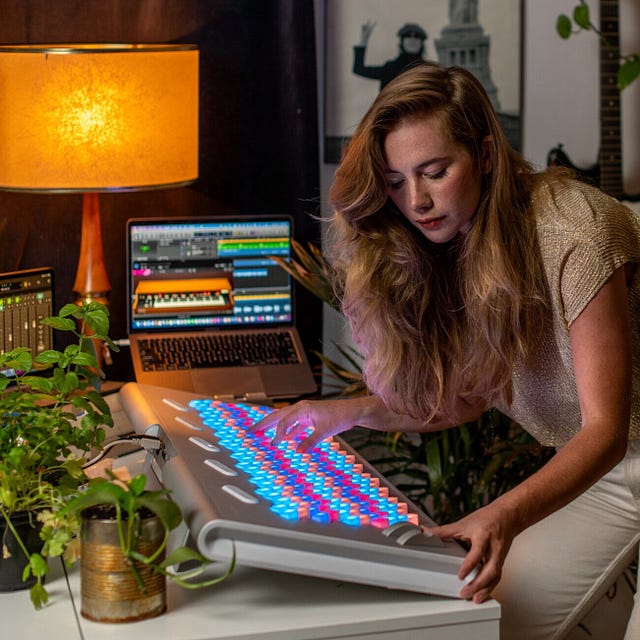
The most famous is the Lumatone, a 280-key hexagonal keyboard with isomorphic layouts specifically designed for equal temperaments and just intonation systems with many notes per octave. It is the only mainstream controller whose physical layout was designed from scratch around microtonal music. Many players say it makes 31edo, 41edo, and 53edo finally feel learnable.
There are also smaller hex controllers, custom isomorphic builds, and various DIY projects. The Wicki-Hayden layout is worth knowing about if you are exploring this corner.
Wind, string, and other controllers
If you play a wind controller (EWI, Aerophone, Re.corder) or a fretless MIDI string controller, you may already have continuous pitch under your fingers and nothing more to set up beyond pointing the synth at the right tuning. Guitarists with MPE-capable pickups can do similar things.
The synth or sampler
Three categories worth distinguishing.
Natively microtonal soft synths. Several mainstream plugins read Scala files directly with no extra software in the chain. The u-he range (Diva, Repro, Hive, Zebra, Bazille) all do this. Pianoteq does it. Surge XT does it, and is free. Arturia’s Pigments does it. If you are picking a starter synth for microtonal work, any of these will save you a lot of friction.
MTS-ESP-aware synths. A larger and growing list of synths read tuning from an MTS-ESP master plugin. This includes most of the above plus Vital, Dexed, the recent Korg Collection, and many others. The advantage is that you change tuning once, in one place, and every track in your project follows.
Plain old fixed-tuning synths. Anything that does not understand Scala files or MTS needs to be retuned via pitch bend or MPE. This is where a host plugin like Entonal Studio (more on that below) earns its keep. It sits in front of the synth, intercepts the MIDI, and rewrites it as MPE or pitch-bent MIDI so that the dumb synth ends up producing microtonal pitches anyway.
DAW considerations
Not all DAWs are equally happy with MPE and microtonal workflows.
Bitwig Studio has the most complete microtonal story. Its per-note expressions are MPE-native throughout, the piano roll can display custom note names from plugins like Entonal Studio, and there are no special tricks needed to record and edit microtonal performances.
Reaper has flexible note expression tools and good MPE support, plus a thriving community of microtonal users sharing JSFX scripts.
Logic Pro, Cubase, Ableton Live, and Studio One all support MPE recording to varying degrees. Live’s support arrived more recently and is still maturing in spots. FL Studio handles MPE too, and shares note names from Entonal in its piano roll.
The thing to test before you commit to a DAW for serious microtonal work is whether you can record an MPE performance, see and edit each note’s pitch bend independently, and play it back identically. That round trip is where DAW-level support actually matters.
Three example workflows
Beginner: a Scala file and a normal keyboard
Buy or download a Scala-aware synth (Surge XT is free and excellent). Find a Scala scale archive online with a few thousand .scl files in it. Load one. Play your normal MIDI keyboard. You are now making microtonal music. Total setup time, ten minutes.
This is genuinely the right starting point for most people. You learn how a tuning sounds and feels before you spend money on hardware.
Intermediate: MTS-ESP across the project
Add ODDSound MTS-ESP Master to one track in your DAW. Pick a tuning from its preset list, or design one. Every MTS-ESP-aware plugin instrument in any track of the project now plays in that tuning automatically. Your keyboard still sends boring 12-note MIDI; the retuning happens silently downstream.
This is the workflow most working microtonalists end up with for studio work. It scales from one synth to thirty without pain.
Advanced: MPE controller and per-note tuning
Plug in a LinnStrument, Osmose, or Lumatone. Decide whether you want each physical key to map to a fixed microtonal pitch (most common), or whether you want continuous pitch with snap zones, or fully continuous. Insert a tuning host like Entonal Studio in front of your synth so it can translate scale degrees into MPE pitch-bend per note. Now you can play 31edo, just intonation, or anything else with the same physical fluency you would expect from a normal keyboard, plus expressive pitch shaping on top.
Entonal Studio
Of the dedicated tuning tools available right now, Entonal Studio from Node Audio is probably the friendliest entry point if you find pure MTS-ESP a bit dry. It costs £79, has a 14-day free trial, and runs as a standalone app, an instrument plugin, or a MIDI effect plugin in AU, VST2, or VST3.
The thing that sets it apart is the visual approach. Instead of editing scales as a list of cents values, Entonal gives you a radial graph where you can drag notes around the octave by hand, optionally snapping them to whole-number ratios. There is also a tuning lattice view that draws just intonation scales as a 2D geometric pattern, with each angle representing a different harmonic relationship. Click a point on the lattice and the note sounds. For people coming to microtonality with no prior theory, this is a much gentler way in than reading numbers.
It hosts other plugins. This is the part many users find most useful. You drop your favourite synth (any AU/VST2/VST3 instrument) inside Entonal, and Entonal handles all the retuning for it via MTS-ESP or MPE pitch bend. You can keep using synths that have no idea microtonality exists, and they will play 22edo or 7-limit just intonation perfectly.
Other features worth flagging:
It ships with around 100 to 200 presets covering equal temperaments from a handful of divisions up through 53edo and beyond, plus just intonation scales and historical temperaments. Good for browsing your way into the territory.
The scale editor accepts cents, ratios, EDO degrees, and mathematical expressions, up to 192 notes per octave. You can change the repeating interval if you are working with non-octave scales like Bohlen-Pierce.
Keyboard mapping is graphical, so you can decide which physical keys play which scale degrees, skip black keys, transpose root notes, or just hit auto-map and move on.
It supports MPE per-note pitch bend, which means it works cleanly with LinnStrument, Seaboard, Osmose, and friends, and you can even route its MIDI output to external hardware synths to retune them too.
It speaks Scala (.scl) and XML for import and export, so any scale you find online can be loaded in seconds, and any scale you build can be shared.
The “Groups” feature lets you sync the tuning across several Entonal instances in different tracks. Change the scale in one, and every track in that group changes with it. This is the Entonal answer to the problem MTS-ESP solves system-wide, and is useful when you want different groups of tracks tuned differently.
It is not the only tool in this space. ODDSound MTS-ESP, Ableton’s Microtuner, Pitchblende, Scala itself, and various free utilities all have their devotees. But Entonal is the one I would point a curious normal-music musician at if they wanted to actually enjoy the exploration phase, rather than feel like they had signed up for a maths course.
Where to go next
Pick a tuning that catches your ear, get it into one synth by whatever method is easiest, and play with it for a week before you change anything. The hardest part of microtonal music is not the technology, it is rewiring your ear to actually hear what these new pitches are doing. The gear is just there to get out of the way.
Useful starting points on the Xen Wiki: the pages on 22edo, 31edo, and 53edo for equal temperaments worth knowing; the just intonation page for the ratio-based world; and the interval page if you want to start naming what you are hearing.
Welcome to the rest of the pitches.
Comments
Post a Comment