Scala is the universal file format and software package for importing and exporting microtonal scales
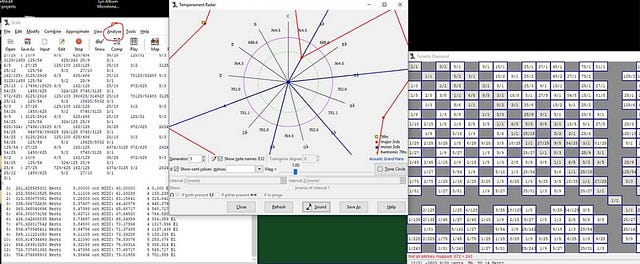
You’ve likely seen the word “Scala” mentioned in passing. Someone in a music production forum will say, “just open it in Scala,” or “here’s the .scl file,” and everyone nods knowingly. Then you go searching for a tutorial and find… almost nothing. A handful of forum threads from 2008. A PDF tutorial about exporting .tun files. A homepage that looks like it was last redesigned during the second Bush administration.
There’s a reason for this. Scala is a free piece of software written by Dutch programmer Manuel Op de Coul, hosted on the website of the Huygens-Fokker Foundation in Amsterdam. It has been the de facto standard tool for working with alternative tunings for over twenty years. Almost every microtonal scale archive on the internet, every plugin that supports custom tunings, every weird scale you’ve ever heard about — there’s a good chance it passed through Scala at some point. And yet nobody teaches it, because the people who use it tend to be either academics, hardcore tuning theorists, or composers who learned it years ago and forgot it was hard.
This article is for the rest of us — musicians who can already write a song, play a chord, and run a DAW, but who hear “31-tone equal temperament” and think what the hell does that even mean. By the end you’ll know what Scala is, why it exists, what to do with it, and what to use instead when it gets in your way.
A two-minute primer on tuning
If you grew up playing piano or guitar, you grew up inside a tuning system called 12-tone equal temperament, or 12edo for short. The octave is sliced into twelve equal pieces, and every interval — major thirds, perfect fifths, whatever — is a fixed number of those pieces. It’s a compromise: nothing is quite in tune, but everything is equally a little out of tune, which means you can play in any key without retuning your instrument.
Microtonality is everything outside that box. You can divide the octave into 19, 22, 31, or 53 equal pieces. You can use just intonation, where intervals are pure whole-number ratios like 3/2 and 5/4 instead of approximations. You can use historical tunings like quarter-comma meantone (what Bach actually heard) or Pythagorean tuning. You can use scales that don’t repeat at the octave at all.
To talk about all this, microtonalists use cents. One semitone in 12edo equals 100 cents. An octave is 1200 cents. The pure 3/2 fifth is 701.955 cents — about two cents sharper than the fifth on your piano. That’s the unit you’ll see everywhere in Scala. When you start measuring intervals in cents, the world cracks open a little.
What Scala actually is
Scala is a desktop application — Windows, macOS, and Linux — that does basically everything you might want to do with a musical scale. You can load one, analyse it, transform it, compare it to another scale, generate new ones from mathematical procedures, hear them on a built-in tone generator, send them out to a synth via MIDI, and save them in any of about thirty different file formats.
Bundled with the program is the Scala scale archive: over 5,000 tuning files collected over decades. Indian ragas, Indonesian gamelan tunings, medieval European temperaments, scales designed by Harry Partch, Erv Wilson, Wendy Carlos, the Sethares book scales, weird non-octave xenharmonic experiments — they’re all in there. Just opening the archive and clicking through it for an hour is, honestly, an education.
The thing that’s made Scala genuinely indispensable, though, isn’t the program itself. It’s the file format Manuel invented to go with it.
The .scl file: the lingua franca of weird tunings
A Scala scale file (extension .scl) is a plain text file that describes a tuning. That's it. You can open one in Notepad. Here's the example from the official .scl format documentation, which is a 12-note quarter-comma meantone tuning:
! meanquar.scl
!
1/4-comma meantone scale. Pietro Aaron's temperament (1523)
 12
!
 76.04900
 193.15686
 310.26471
 5/4
 503.42157
 579.47057
 696.57843
 25/16
 889.73529
 1006.84314
 1082.89214
 2/1
Lines starting with ! are comments. The first non-comment line is a description. The second is the number of notes. After that comes one note per line — either as a decimal cent value (like 76.04900) or as a frequency ratio (like 5/4). The last note is the interval of repetition, almost always 2/1 for an octave.
This format is so simple, and so easy for other software to parse, that it became a standard. Today, when a synth advertises microtonal support, what they almost always mean is “it loads .scl files.” Surge XT, Pianoteq, u-he Zebra, Native Instruments Kontakt, Logic Pro, Cakewalk, Yoshimi, ZynAddSubFX, Sforzando, and dozens more all read .scl. The Scala program itself may be obscure, but its file format is everywhere.
Getting Scala onto your computer
Go to huygens-fokker.org/scala, find the download page, and grab the version for your operating system. Installation is uneventful on Windows. On macOS and Linux it’s slightly more annoying — there’s a GTK dependency and the app looks like it escaped from 2003 — but it works.
When you launch it, you’ll see two windows. The top window is a log/output area where Scala prints information. The bottom is a command prompt with a blinking cursor. There are menus too, but the program was originally a command-line tool, and it shows. Most of the manual assumes you’re typing commands.
This is the moment most beginners give up.
Don’t. The commands aren’t bad once you know a few of them.
Five commands that get you 80% of the way
Open a scale from the bundled archive: File → Open Scale, then navigate to the scl folder inside the Scala install directory. Pick something with a recognisable name like meanquar.scl or partch_43.scl and open it.
Now type these commands, one at a time, pressing Enter after each:
show — prints every note in the scale, in cents and as a ratio if it has one. This is the single most useful command in the program.
show data — gives you a fuller analysis: every interval class, every consonance, what equal temperament the scale resembles, and so on.
play — plays the scale up and down on the built-in synth. (You may need to set up audio under Edit → Preferences → Synthesizer.)
equal 19 — replaces the current scale with 19-tone equal temperament. Try equal 31, equal 22, equal 53. Type show after each to see what they look like.
help — opens the manual, which is enormous. Type help followed by a command name to get docs for that command.
That’s enough to start exploring. Go to File → Open Scale, look through the archive, and show and play everything that catches your eye. You will find scales you didn't know were possible.
Making your own scale
Two ways. The hard way: open a text editor, type out a .scl file by hand, save it, and load it.
The easy way: in Scala, type equal 12 to start fresh, then use the mode command. mode 2 2 1 2 2 2 1 builds a major scale (the steps of a major scale in semitones). Type show and admire your handiwork.
For just intonation, type something like set notation E2, then add 1/1, add 9/8, add 5/4, add 4/3, add 3/2, add 5/3, add 15/8, add 2/1. You've just made a 5-limit just-intonation major scale, the same one your ear is constantly trying to drag a string quartet toward.
Save it with File → Save Scale As, give it a .scl extension, and you've got a tuning file you can load into any compatible synth on the planet.
The keyboard mapping problem
Here’s where things get tricky, and where Scala starts feeling its age.
A standard MIDI keyboard has 12 notes per octave. If your scale has 12 notes too, mapping them is obvious. But if your scale has 19, or 31, or 43, what happens when you press a key? Which scale degree does C map to? Which one does C# map to? What happens above the keyboard?
Scala handles this with a second file format, the keyboard mapping file, extension .kbm. It's also plain text, and it tells the synth: this MIDI note maps to this scale degree, this is the reference pitch, this is the formal octave, etc. Sevish has written a great tutorial on keyboard mapping in Scala that's worth reading once you reach this stage.
A .scl file alone gives you a scale; a .scl plus a .kbm gives you a playable instrument. Many synths support both, but a frustrating number support only .scl, in which case you’re stuck with whatever default mapping the synth chooses.
Connecting Scala to a synth
Scala can send tunings to a synth in several ways. The cleanest is to export a tuning file in the format your synth expects — .scl, .kbm, .tun, MIDI sysex, MTS — and load that file in the synth. There’s a tutorial PDF on the Huygens-Fokker site specifically about generating .tun files this way.
Scala can also act as a real-time tuning bridge: you route MIDI through it, and it retunes incoming notes using pitch bend before passing them to the synth. This works, but it’s clunky in 2026, and it’s part of why so many people have moved on to newer tools.
What Scala isn’t good at
Let’s be honest. Scala was designed in the late 1990s by a tuning theorist for tuning theorists. It is staggeringly powerful — there are commands in there I doubt any single human has ever used — but its workflow does not fit modern music production.
You can’t just drop it into your DAW. The interface is austere. The MIDI routing for live retuning is a maze. There’s no plugin version. The graphics are functional rather than pretty. The keyboard mapping system is correct but unforgiving. Configuring audio output on a modern Mac can feel like a personal attack.
For understanding tunings — analysing a scale, generating one mathematically, comparing two of them, browsing the archive — Scala is still unmatched. For making music with tunings inside a DAW in 2026, you probably want something else.
Enter Entonal Studio
Entonal Studio is a microtonal tuning plugin and standalone app released in 2022 by Node Audio. It runs as VST2, VST3, AU, or standalone on Windows, macOS, Linux, and iOS. It is exactly the tool that didn’t exist in the Scala era, and it solves most of the problems above.
The core idea: you put Entonal Studio on a MIDI track in your DAW (or you use it as a plugin host that loads your synth inside it). You pick a tuning, either from the 200+ built-in presets or by editing one yourself, and Entonal retunes any synth downstream of it using MIDI pitch bend, MPE, or MTS-ESP. The synth doesn’t need to support microtonal tuning natively — Entonal handles it for you.
Where Scala has a command line, Entonal has a beautiful radial graph: a circle representing the octave, with each note as a draggable point. You can drag notes freehand in cents, snap them to ratios in a given prime limit, or snap them to degrees of an EDO. You can see the tuning lattice light up as you build a just intonation scale. You can map your scale to the keyboard with a clear visual interface, including white-keys-only mappings and skipping notes.
And — this is the key bit — Entonal Studio imports and exports Scala .scl files. The decades of work that lives in the Scala archive is fully accessible. You can load a 43-tone Harry Partch scale, an Indonesian pelog, a Wendy Carlos alpha scale, browse them visually, modify them, and have them retune any synth in your project, all without leaving your DAW.
It costs around £79 (with a free trial), which is not nothing, but it’s the closest thing the microtonal world has to a polished, modern, plug-and-play tool. If you’ve been Scala-curious but bounced off the interface, Entonal is what you want.
So where does that leave Scala?
Don’t skip it. Even with Entonal Studio handling your day-to-day, learning Scala teaches you the underlying concepts — cents, ratios, scale generation, commas, MOS scales — in a way that nothing else does. Spending an evening with the Scala archive is like spending an evening in a library: you’ll come out with ten new ideas you didn’t know existed.
Use Scala to think in tunings. Use Entonal Studio (or your DAW’s native support, if you’re lucky enough to have it) to play in them. Read the Xenharmonic Wiki when you get stuck. The microtonal world is small and welcoming and weirder than you can possibly imagine, and the door has been propped open for twenty years. Go through it.
Comments
Post a Comment